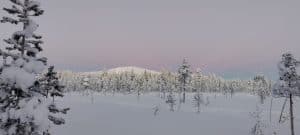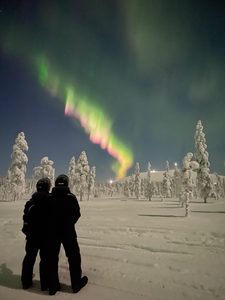
Northern Lights season is ON and quite spectacular already!

Don’t have a tripod or camera? No problem. Modern smartphones can still capture the aurora if you know a few tricks.
Preparation
-
Find the night mode or pro/manual mode on your phone’s camera app.
-
Clean your lens (northern lights often appear faint, so clarity matters).
-
Reduce screen brightness to save your night vision.

Best Settings (if available in Pro Mode)

-
Focus: Set to infinity or far objects.
-
ISO: Start around 800–1600.
-
Shutter speed: 3–10 seconds (depending on brightness of aurora).
-
White balance: Around 3500K, or leave on auto if unsure.

Tips for Shooting Without a Tripod
-
Stabilize your phone: Rest it on a rock, fence post, backpack, or even the ground.
-
Use the timer: Set a 3-second delay so you’re not shaking the phone when you press the shutter.
-
Hold still: If you must shoot handheld, lean against something solid, press your elbows into your body, and stay as steady as possible.
-
Burst mode or video: Some phones capture auroras surprisingly well in short videos or bursts that can later be extracted into still images.

Some smartphones such as iPhone or Google Pixel Pro offer a great night mode picture quality and their electronic stabiliser allows to take pictures ny hand for 3-5 seconds without any blur effect.
Pictures in this article were taken without tripod with Google Pixel 8 Pro
BOOK YOUR NORTHERN LIGHT TOUR NOW WITH NORTH WIND LAPLAND IN YLLÄS